Month: April 2020

Social Media Marketing

Facebook and Instagram Verification Process

April 26, 2020

Have you ever wondered what you can do to obtain the coveted blue check verification? How do you apply? What happens when you do? What factors are considered? Here you’ll get the scoop on the verification process and ways to secure your accounts on Facebook and Instagram.

Verification Badges

Verified badges on Facebook and Instagram appear next to the Page or account’s name, as well as in search. This shows that Facebook and Instagram have confirmed that an account is the authentic presence of the creator, public figure, celebrity, or global brand it represents and helps people more easily find the accounts they wish to follow. Facebook and Instagram’s verification team vets all requests thoroughly and base their review on a number of inputs to determine whether an account is eligible to be verified.

Verification Review Criteria

Facebook pages must follow Facebook’s Terms of Service and Community Standards
Instagram accounts must follow Instagram’s Terms of Service and Community Guidelines.
In addition to the above, accounts must also be:
Authentic: Your account must represent a real person, registered business or entity.
Complete: Your account must be public and have a bio, profile picture and at least one post. Your profile can’t contain “add me” links to other social media services.
Unique: Your account must be the unique presence of the entity it represents. Generally, one account per entity may be verified, with exceptions for language-specific accounts. Facebook and Instagram doesn’t verify general interest accounts (e.g., puppy memes).
Notable: Your account must represent a well-known, highly searched for individual, brand or entity. We review accounts that are featured in multiple news sources. Facebook and Instagram don’t consider paid or promotional content as sources for review.

Verification on Facebook

Contact our social media marketing team if you’d like help applying for a blue verification badge.
To request a blue verification badge, your Page or profile must comply with Facebook’s Terms of Service and have several supporting documents.

Facebook - Request A Blue Verification Badge

Safety on Facebook

Stay safe and secure by learning the ways to protect yourself, your fans and your account on Facebook.
Turn on 2-factor authentication and add an extra layer of security for your account.
Get alerts like notifications on unrecognized logins.
Manage your time so you can have more control over time spent on our platforms and a new way to limit notifications.

Facebook - Steps to Request A Blue Verification Badge

Safety on Instagram

Learn the ways to protect yourself, your fans and your account on Instagram

Add an extra layer of security for your account by turning on 2-Factor Authentication
Filter out comments you don’t want to appear on your posts with comment moderation.

Take control over time spent on our platforms and limit notifications.

The Social Group™ is a Facebook Partner Agency and Blueprint certified. Contact our social media marketing team to help elevate and quantify your social media efforts. If you’re looking to expand into other digital marketing initiatives, reach out to our Search Engine Optimization and Google Ads team.


Source: Facebook Partner Agency Resources

Social Media Advertising, Social Media Marketing

The Social Media Measurement Journey

April 22, 2020

Focus on Metrics that Matter

Begin with making a strategic decision on what is measurable that best aligns to your brand’s broader business goal. Consider what data is available and what tracking capabilities are possible through Facebook platforms or partners such as Instagram and Audience Network.

Focus on metrics tied to a key business goal (e.g. brand awareness or online sales) and try to move away from a reliance on proxy metrics (e.g. post engagement or click through rate). These can still be tracked as secondary metrics..

Better data signals lead to more actionable measurement. Digital marketing through Facebook’s product platforms offer a variety of methods to use data signals for measuring outcomes. Some examples include use of the Facebook pixel, App SDK or Offline Conversions. There also are solutions to help you customize this data further (e.g. Custom Conversions) to get closer to the metric that really matters. To set up for advertiser success, focus on metrics that matter and consult with our social media marketing team.

Questions to Consider

  • What success metrics are being tracked?
  • Are these metrics driving your brand forward, or are they proxies?
  • If proxies, are they correlated with business outcomes?
  • What data sources are fueling my success metrics?

Signals

  • Ads Manager Reporting Metrics (Reach, Impressions, Clicks)
  • Facebook Pixel
  • Facebook or Partner SDK
  • Offline Conversions
  • Custom Conversions
  • Leads API


Understand Results that Facebook Currently Drives

Understand the return on investment Facebook is driving for your brand. Assess incremental impact of the key metric, if possible.

The solutions we recommend use experimental design to evaluate causal impact of advertising. We define incrementality as the degree to which a measurement method estimates the true causal effect of an isolated marketing activity. The ideal process is to design an experiment using a simple test vs. control framework to isolate the variable. In this case, the variable tested will help a brand better understand the value of media spend.

The Social Group™ team, working with Facebook, offers a variety of options to explore incrementality: using the self-service lift solution (Ads Experiments available in Ads Manager).

To set you up for success, understanding the incremental return on ad spend is critical before moving into testing specific variables for further optimizing on the platform.

Questions to Consider

  • Is Facebook and related products driving sales?
  • Is Facebook and related products driving my brand?
  • Do I know if these results are incremental?
  • Which attribution model should I use

Measurement Solutions

  • Facebook managed and partner* Brand Lift (baseline incremental performance testing)
  • Facebook managed and partner* Conversion Lift (baseline incremental performance testing)
  • Ads Experiments (self-serve Brand Lift and Conversion Lift)

*requires a Facebook rep to activate and inform which regions are supported for these solutions. The Social Group™ can help.


Optimize Your Performance

To make the most of a brand’s efforts across social media marketing, it is best to develop a testing mindset, adjusting our strategies based on insights from our tests to decide what works best. Our best practices can guide you in getting started and set up for success. Beyond that, we recommend creating a brand specific test plan to learn what works to further optimize towards your business goals.

We begin with a hypothesis and align on decisions we will make based on the test outcome before getting started. Solutions offered include Split Testing (A vs. B) and multi-cell Lift (A with test and control vs. B with test and control). These designs allow us to isolate one variable: bid strategy, creative, placement, etc. to better understand which strategy drives more of the key business outcome your brand prioritizes.

Questions to Consider

  • Which creative strategy works better?
  • Which audiences respond best to my message?
  • How should I address full funnel messaging?
  • What is the impact of prospecting on sales outcomes?
  • Which campaign drives more awareness of a product?

Measurement Solutions

  • Split Testing (A vs. B; no control groups)
  • Facebook managed Conversion Lift (comparison testing; with control)
  • Facebook managed Brand Lift (comparison testing; with control)
  • Facebook managed and partner* offline sales lift measurement solutions (comparison testing; with control)

*requires a Facebook rep to activate and inform which regions are supported for these solutions. The Social Group™ can help.


Determine How Social Media Marketing Fits in the Media Mix

Solutions in this phase help brands better understand how channels assist one another and work together to drive outcomes when more than one is involved in a consumer journey. These tools inform longer-term strategic decisions like media budget allocation.

In order to best understand how much an advertiser should credit Facebook and family products such as Instagram as a channel, it is important to have first addressed how many incremental outcomes can be attributed to ad exposure. This requires using experimental design to compare outcomes to a control, as recommended in the two previous phases of the journey.

Social media marketing is intended to help brands approach this with supplemental data points to their existing source of truth systems to better understand the impact each channel had. Each of these solutions has its own methodology whether it be experimental design or modeled data. Choosing the right approach requires business context.

Questions to Consider

  • How does cross device behavior impact measurement of outcomes?
  • How does social media marketing complement and compare with other channels?
  • How much credit should Facebook family products (i.e., Instagram and Audience Network) get in an attribution or media mix model?

Measurement Solutions

  • Facebook Attribution
  • Partner MTA*
  • Facebook’s Matched Market Lift (limited regions)*
  • Mobile Measurement Partners (MMP)*
  • Viewability Verification*
  • Marketing Mix Modeling (MMM)*

*requires a Facebook rep to activate and inform which regions are supported for these solutions. The Social Group™ can help.


Inform Total Media Spend with Better Data

The journey is never over. Brands can move back and forth on the measurement journey based on priorities and business questions. It’s a good idea to revisit any of the previous phases when there is a new marketing objective, message or audience. The adoption of a testing and learning mindset is accomplished when your brand is making data-driven decisions to inform your total media spend and evaluate where to best place your next marketing dollar.

It is important to test assumptions and determine what will drive the most growth and profitability for your brand. Continue to inform your media plans through testing tools outlined in the previous steps. Doing this well requires data-driven ways of working and an agile approach to testing.

Questions to Consider

  • How much budget should be allocated to specific channels?
  • What systems should I use to drive better attribution?
  • Do my measurement tools account for cross device behavior?
  • Am I using ongoing iterative testing to make better decisions?
  • How do people navigate through my website or app before conversion?

Measurement Solutions

  • Leverage all solutions that can help answer ongoing business questions. Specifically, Attribution, MTA Partners*, MMP*, and MMM* help address total media mix measurement.

*requires a Facebook rep to activate and inform which regions are supported for these solutions. The Social Group™ can help.

As a Facebook partner agency, The Social Group™ has the tools and experience to elevate your brand, integrate multi-dimensional marketing campaigns, quantify our efforts and amplify your goals. If you’d like to work with us, drop us a message!


Source: Facebook Partner Agency Resources
Digital Marketing Updates

Media Buying Strategy for 2020

April 20, 2020

For many media strategists and buyers, machine learning remains a bit of a mystery. Sure, the ability to apply sophisticated computer systems and artificial intelligence to problems sounds exciting, but can it actually help with optimizing media buying based on complex human behaviors and dealing with day-to-day advertising challenges?

Simply put: Yes, it absolutely can. Facebook has been building its own machine-learning based tools to make customer discovery more efficient, measurement more accurate and personalization more targeted. In doing so, we’ve seen that the technology has a number of powerful capabilities that significantly boost campaign performance as well as team productivity. Moreover, these benefits can be realized right now—not some day in the far-off future.

Specifically, machine learning can already make life better for media strategists and buyers in these four key ways:


1. Improve advertising effectiveness by increasing liquidity

Machine learning is especially valuable for media buying because it boosts liquidity—a state in which every dollar flows to the most valuable impression.

Through the use of serial algorithms and predictive analytics, machine learning can quickly find the optimal audience for each ad. Paired with automated systems, the right creative can then be served to the right person at the right time—and at the right price.

This can make media buying both faster and better. Machine learning and automated systems rapidly process massively complex data sets and adjust in real-time, enabling teams to continually improve campaign effectiveness.

“Using automated, machine-learning driven optimizations always helps over trying to do it manually. We immediately see much better performance.”


digital marketing agency

2. Simplify campaign setup and optimization

Another benefit of machine learning is that it streamlines campaign management.

Specifically, media buyers and strategists surveyed who use machine learning-enabled tools say these systems reduce the amount of manual effort needed to tackle tasks such as campaign optimization/bid strategy, budget management and campaign setup.

This simplification is largely due to the fact that machine learning and automated systems tend to work best when given leeway, since broader campaign goals and parameters increase the available options. In other words, reducing the number of ad sets and campaign restrictions enables more automated optimizations. The Social Group™ team is Facebook Blueprint certified and can help envision, create, launch and manage your social media campaigns.

“We’ve been able to shift away from manual managing of performance to observing performance and spending time pulling out deeper analysis.”


3. Gain more (very valuable) time

Simplified campaign management delivers something of immense value to media buyers and strategists: more time.

Of those surveyed, some 77% of media buyers and strategists in the US who use machine learning-enabled tools say these systems save them significant amounts of time spent on manual and tedious tasks, with most saying they gain back between one and four hours per week, on average.1

Again, these benefits are driven by the autonomous and self-learning capabilities of the machine learning tools. The systems are able to process ever-changing data points quickly and efficiently on their own, enabling team members to save the time previously spent on manually defining and honing campaigns. If you’re looking to create new Google Ads campaigns or improve upon existing ones, our Search Engine Marketing team can help.

“We used to have 50 ad sets live at any time for a campaign, and we were constantly having to figure out what was working. Now thanks to machine learning-based liquidity tools, the accounts have fewer ad sets and are easier to manage.”


seo agency fort lauderdale

4. Be more strategic and creative

Why is gaining time so important? Because it allows for all that brainpower to be applied to other things.

Strategists and buyers surveyed say they put the time they gain from machine learning tools toward a mix of tasks, including developing client strategies, planning and testing new campaigns, analyzing the performance of existing campaigns and making creative optimizations. 1

Ultimately, that’s what makes machine learning even more valuable: Not only does it improve campaign performance, but it also enables media strategists and buyers to be more focused, strategic and creative.

“Before we had to do so much manual budget shifting. Now we can use that time on strategy. We can look at different audiences, tests and creative optimizations. It helps us be more forward-thinking.”

Something important to note about machine learning is that in order to harness its many benefits, strategists and buyers may need to rethink how they work. For example, it may be necessary to embrace broader campaign parameters and budget strategies, reduce the number of ad sets and reconfigure how performance is reported to clients.

While making these changes may require significant short-term effort, it will set teams up for greater success in the rest of 2020—and well beyond.

What it means for marketers

The Social Group - Check Mark

Greater liquidity leads to better results.

Machine learning matches advertising spend to the most valuable impressions in real time. This ability to rapidly process data on the fly delivers continually improving campaign effectiveness.

The Social Group - Check Mark

Campaign management can be easier.

Machine learning and automated systems work best with more leeway. This means less manual effort is needed to tackle tasks such as campaign setup, optimization and measurement.

The Social Group - Check Mark

More time enables teams to focus elsewhere.

By simplifying campaign management, machine learning tools free up time for strategists and buyers. This gives teams the opportunity to be more focused, strategic and creative.

The Social Group - Check Mark

Harnessing the full power of machine learning takes work.

Machine learning often requires new ways of working. Teams may need to embrace broader campaign parameters, reduce ad sets and reconfigure reporting to clients.

Source: Facebook for Business; Parter Agencies (The Social Group™)

Digital Marketing Updates

Inside Facebook: Protecting Your Brand on Social Media

April 16, 2020
The following is a resource announcement (Q4, 2019) made available to The Social Group™ as a Facebook Partner Agency.
One of our goals is for Facebook to be a platform that gives people a voice, while keeping them–and businesses like yours–safe. That’s why we’re focusing on brand safety in our latest Good Questions, Real Answers blog post, defined by the Internet Advertising Bureau (IAB) as “…keeping a brand’s reputation safe when they advertise online.” At Facebook, we work to create transparent policies and relevant controls to ensure you feel informed and in control of your brand’s reputation. Today, we’ll address some questions around how content is removed from our platforms to maintain a safe space; how we work with brand safety leaders in the industry; and additional details around a new control we’re testing, White Lists.

How much content does AI remove automatically?

Starting in Q2 2019, we began removing some posts automatically, but only when content is either identical or near-identical to text or images previously removed by our content review team as violating our policy, or where content very closely matches common attacks that violate our policy. We only do this in select instances, and it has only been possible because our automated systems have been trained on hundreds of thousands, if not millions, of different examples of violating content and common attacks. In all other cases, the content is still sent to our review teams to make a final determination. While our systems’ abilities to correctly detect violations continue to progress, people will continue to play an important part in keeping our platform safe: both the people who report content to us, and the people on our team who review that content.

We use automation and artificial intelligence to stop spam attacks, remove fake accounts, and identify additional instances of content we’ve already removed for violating policies including child nudity, sexual activity, terrorism and now, hate speech. But a lot of content is very contextual and nuanced, like determining whether a particular comment is bullying. That’s why we have people to look at those reports and make decisions based on our Community Standards.

Do you release any information about the types of content that are removed?

The Community Standards Enforcement Report (CSER) holds the company accountable when it comes to showing progress in removing harmful content from our services. CSERs detail how we’re doing on enforcing our policies by providing metrics across a number of policy areas, including: the prevalence of harmful content, the amount of content we took action on, and how effectively we proactively detected harmful content.

In November, Instagram was included in the report for the first time, and we released metrics on how well we’re enforcing our policies in four areas: child nudity and child exploitative imagery, drug and gun sales, terrorism, and suicide and self-injury content. Facebook also shared metrics for these areas, among others. You can see the report and metrics here.

Why don’t you include time to take down content?

We measure how often violating content is seen on Facebook (the views) as opposed to reporting on time (how quickly we removed the content) because one post that we pull down in 2 hours could have been seen by 1 million people while another post that took us 24 hours may have only been seen by 100 people. The prevalence number is based on how often violating content is seen on Facebook relative to the how often any content is seen on Facebook — by estimating the views, not the amount of violating content, and dividing it by the views of all content at a given moment. So while we work to ensure violating content is up for as little time as possible, what really matters is how many people could have seen the post. We believe it’s a meaningful measurement of people’s experience on Facebook.

facebook partner agency

What’s your approach to collaborating with brand safety industry bodies?

We collaborate with industry partners to share knowledge, build consensus and work towards making all online platforms safer for businesses.

In addition to our work with Global Alliance for Responsible Media, we recently completed JICWEBS’ Digital Trading Standards Group’s Brand Safety audit, receiving the IAB UK Gold Standard. Industry partners are a valuable source of feedback for us. Working with these industry bodies allow us to share knowledge industry-wide and collaboratively make Facebook and all online platforms safer for people and businesses.

When will Facebook be rolling out White Lists?

We recently announced we’re starting with a small test for select advertisers. We’ll plan to learn from this test before rolling this out more broadly next year. The test will apply to all sites / apps for Audience Network and Facebook pages for in-stream ads. Advertisers are responsible for building their own White Lists and each advertiser has access to their own list only.

We understand that for advertisers, protecting the integrity of your brand is never done. We’ll keep finding new ways to ensure our platforms continue to safely give people a voice while helping brands thrive.

If you’re interested in exploring how The Social Group™ can help amplify and quantify your brand across various social platforms, send us a message!

Instagram Marketing, Marketing - COVID-19

Instagram Marketing Playbook for Brands During a Crisis

April 14, 2020

INSTAGRAM MARKETING FOR BUSINESS
COVID-19 PLAYBOOK

How brands can take action during a crisis


Source: Facebook Marketing Partner Resources, The Social Group™


In the wake of the COVID-19 pandemic, people, communities and businesses around the world are facing a difficult time adjusting to a new way of life. For the world’s businesses, the health, safety and wellness of their employees and customers is a critical priority. We also recognize that in this complex climate, companies are facing major challenges as their business-as-usual operations are disrupted.

Businesses are dealing with uncertainty about how to reach and serve their customers in authentic ways that provide value and reassurance. According to a Kantar survey on what consumers expect from brands in the time of COVID-19, brands that were able to deliver purpose in an ethical way saw their value grow twice as much as average brands. People expect brands to deliver real value, act responsibly and do right by the community, including their employees.(1)

In this playbook, we’re sharing some creative ways for you to be purposeful in this time of social distancing by doubling down on digital tools, authentically engaging with your community and keeping open lines of communication with your customers. To help you get moving as quickly as possible, we’re also sharing tactical “how to” guides to get you set up with Instagram tools.

At Instagram, we understand the gravity of this challenge, and we want to do everything we can to help your business connect with your communities and customers. Let’s get started.

For more information from Instagram & Facebook on building resilience for your business during the COVID-19 outbreak, contact our team.

1COVID-19: What do consumers expect from brands?” by Kantar, Feb 2020. The study is based on an online survey of 3,000 consumers between the ages of 18 and 60 across six countries in the region: Singapore, Indonesia, Philippines, Korea, Japan, Thailand. Fieldwork was conducted between 25 and 27 February 2020. Kantar’s panel data and social media analysis over the period between 18 Dec and 27 February 2020 complements the survey.


→ Expand your business and services digitally.


TAKING ACTION DURING COVID-19

As physical distancing becomes a reality for people and communities around the world, businesses need to communicate with customers in creative ways using digital platforms. Instagram can help businesses stay relevant and keep giving people the things they love in this uncertain time. That means bringing communities together in the moment, offering further ways to shop online instead of in-store, and providing a place to educate and entertain customers with interactive video experiences.


TOOLS TO USE

→ Instagram Live

→ Instagram Shopping

→ IGTV

Bring your community together in the moment with Instagram Live.
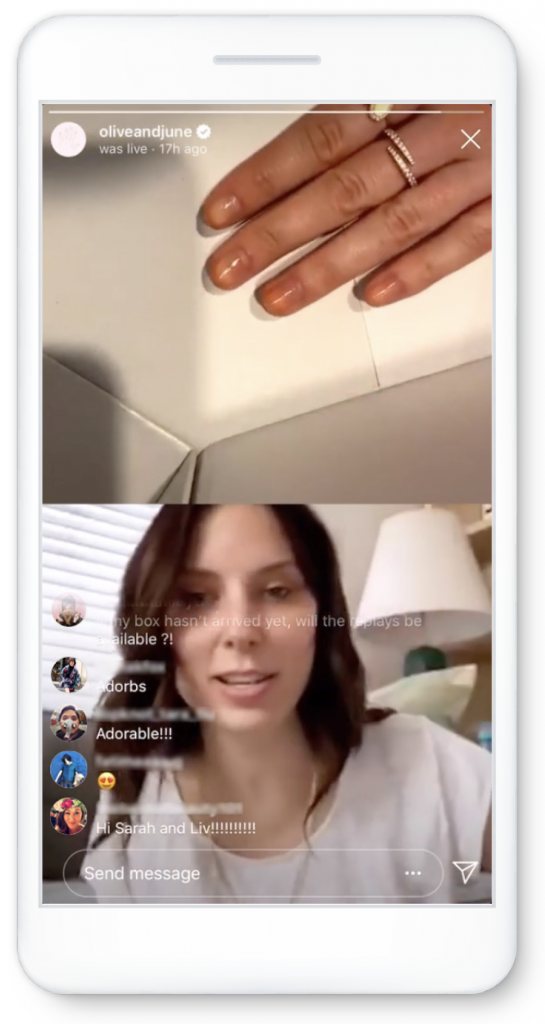
 

Bring your community together in the moment with Instagram Live.

At a time when it’s best to create space apart, we can connect together online. Bring events online or host a Q&A with Instagram Live, and you can even ask a friend to join. We’re seeing creators, public figures and businesses go live to educate and entertain people. Instagram and Facebook Live views doubled within a week in Italy(2). To get as many viewers for your Instagram Live as possible, tease it on Feed and Stories before you go live, and post your Live video to Stories when you’re done so it shows up for 24 hours.

You can also save your Live video and upload it to IGTV.

→ Here’s some inspiration:

  • Nail polish brand Olive & June (@oliveandjune) is hosting live mani bootcamps, sharing manicure tips and asking followers what they want (free shipping, nail challenges, ).
  • Illustrator Wendy MacNaughton (@wendymac) is showing kids of all ages how to


(2)Facebook Internal Data, Mar 2020.

Offer ways to shop online versus in-store.

With people spending less time outside their homes, allow them to shop online and find the information they need via Instagram. Make sure your website URL is listed in your business bio on Instagram. If you have closed your store or have limited hours, this is also a good place to share this info. If you offer gift cards, let your followers know so they can support your business now and enjoy later.

If you sell products, use Shopping Tags so that people can shop your products directly from Feed and Stories. By doing this, your products will also populate in your Profile Shop, where people can browse products that matter to them while on your brand’s profile page.

→ Here’s some inspiration:

  • Cake shop Butter& (@butter_and) is offering a small “PSA” cake for local delivery in San Francisco with CDC advice stenciled on top like “wash your hands.”
  • Writer Helen Rosner (@helenr) is sharing merchandise from small businesses that people can purchase to show their support.
  • Chipotle (@chipotle) is now offering free delivery and promoting this service on Feed and Stories, along with going Live for lunchtime concerts with musicians such as Luke Bryan.
  • Take a look at Instagram’s @shop page for creative ideas on making your profile shoppable.
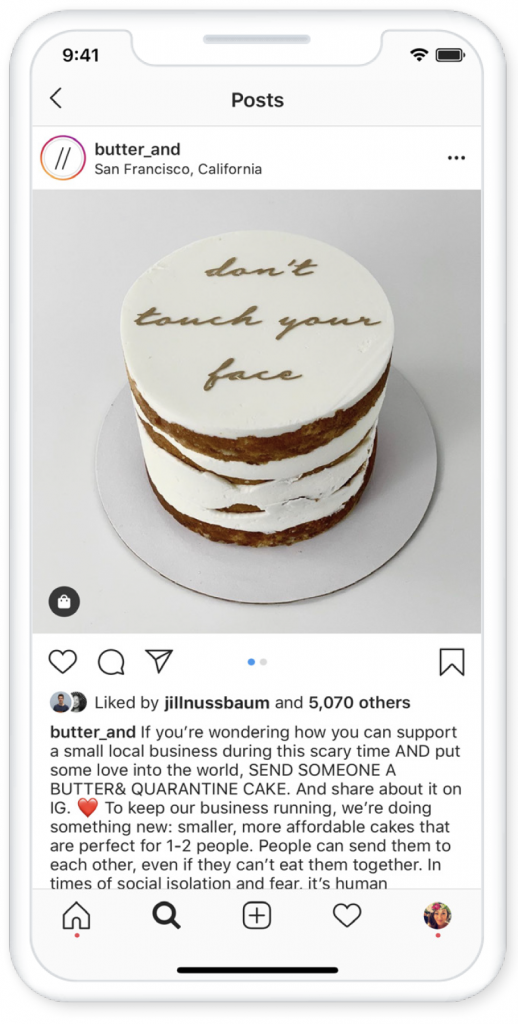
Offer ways to shop online versus in-store.

Use IGTV to share long-form content to educate and entertain.

If you want to share longer-form content, try IGTV.

It allows you to engage deeper with your audience by sharing longer, serialized content that people can tune into any time. Create content around topics related to your business.

→ Here’s some inspiration:

  • Barry’s (@barrys), the high-energy exercise class, is creating daily classes on IGTV for their community to follow along at home.


→ Get your message out and connect to your community

TAKING ACTION DURING COVID-19

Instagram can help you reach your audience—whether you are currently open, closed, changing your business model, sharing items in stock, offering discounts or helping your community. Brands are also using Instagram to reinforce their commitment to their community and show care and positivity during an uncertain time.

TOOLS TO USE

→ Instagram Feed

→ Instagram Stories

Share your important messages on Feed.

Feed can be used to share communications and highlights that your community will be able to see over time.

It’s a place for important messages that will live on your business profile. You can also share #calmingcontent in Feed to help people stay positive and inspired. Consider running ads to expand the reach of your important messages if you want to target specific audience segments.

→ Here’s some inspiration:

  • Michelin-starred Canlis Restaurant (@canlisrestaurant), is changing their service to offer takeout and delivery of family meals.
  • Recipe box company Gousto (@goustocooking) is committing to their community and promising those who are vulnerable that they will still be able to deliver fresh food, donate to food banks and give discounts.
  • Shoe brand Rothy’s (@rothys) is sharing Feed posts about the steps they’re taking to close stores and keep the community safe.
  • Wedding dress company Anomalie (@anomalie) raised awareness for a fundraiser on their Feed, to raise money and use their supply chain connections to get certified masks to frontline workers.
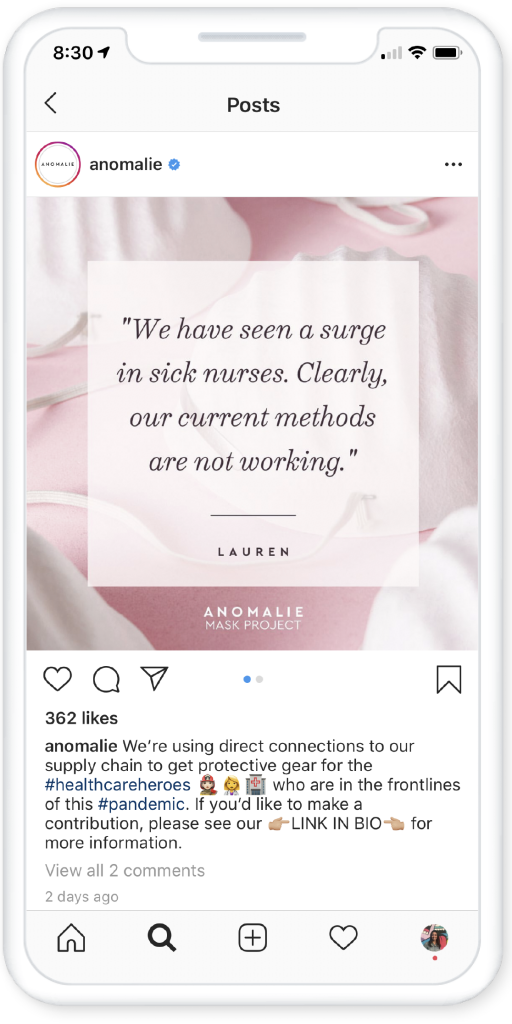
Share your important messages on Feed.

Use Stories to share your story.

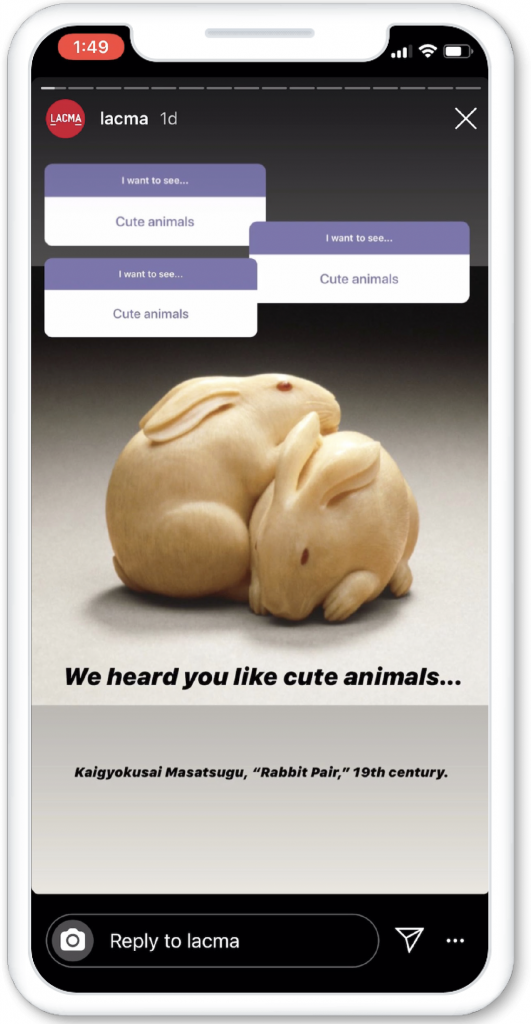
Use Stories to humanize your brand and drive entertaining engagement with your community. Stories is an ideal surface to share timely messages during this rapidly evolving situation. Since Stories are viewable for only 24 hours, you can use them to keep your followers up to date on the latest news from your business, like changing hours or inventory in stock.

Use interactive stickers like the Polling sticker and Questions sticker to engage with your audience by finding out what they want to hear from you and what they need from your business. Use the new Instagram “Stay Home” shared Stories sticker to encourage your followers to keep the community safe by staying home. Engage your followers on Stories with daily content and challenges using the “Stay Home” sticker—for example, posting recipes, workout routines or daily quotes.

The authentic nature of Stories makes it a great place to go behind the scenes of your business to show your customers what’s really happening and how you’re feeling in this uncertain time.

→ Here’s some inspiration:

  • Clean olive oil company Brightland (@wearebrightland) is sharing home recipes from their community.
  • The LA County Museum of Art (@lacma) is using the Questions sticker to find out what people want to see, then sharing relevant pieces of art.
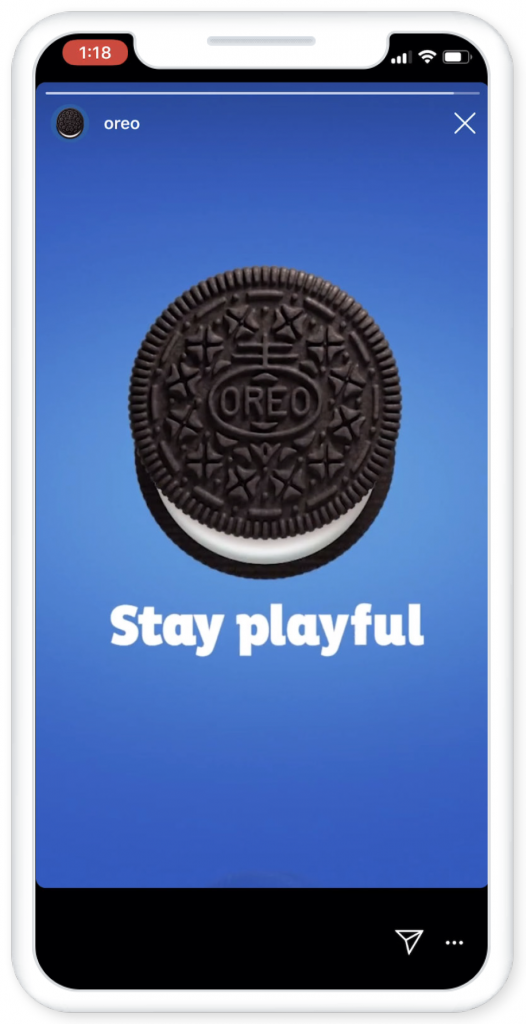
  • Cookie company Oreo (@oreo) is using Stories creative to remind everyone to “stay playful” and connected using video chats.
Use Stories to share your story.


TAKING ACTION DURING COVID-19

If your Direct inbox is flooded with messages, you can stay on top of communication by effectively managing your messages and also setting up FAQs to answer common questions for your customers.

→ Communicate with your customers.

TOOLS TO USE

→ Instagram Direct

→ Instagram Stories

→ Instagram Feed

Use Direct to keep a dialogue open with your customers.

Manage your Instagram Direct messages straight from your account inbox or use our business tools within your Facebook Page inbox (note that you must first connect your Facebook Page and Instagram account).

You can also use Quick Replies to save time when responding to frequently asked questions

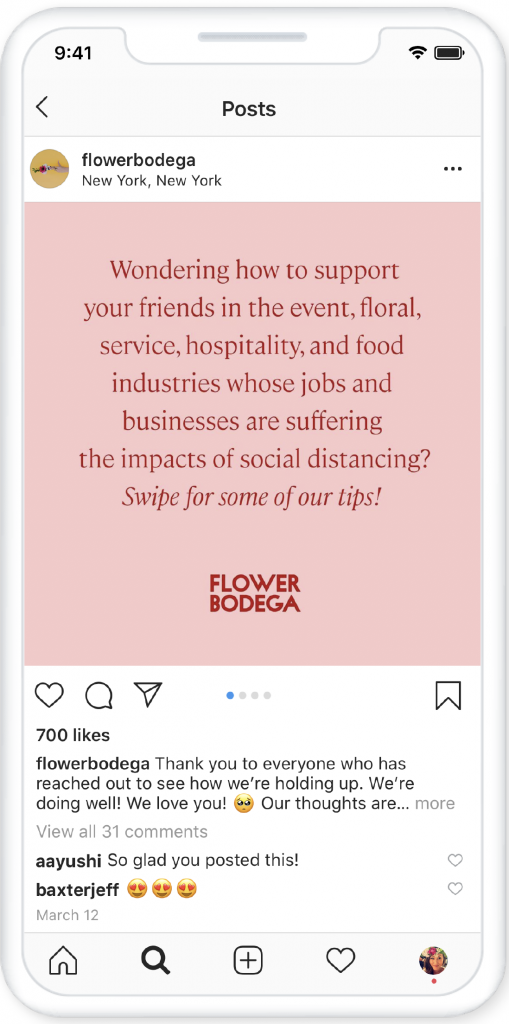
Use other Instagram surfaces to answer FAQs you’re seeing in Direct.

You may not have time to answer every message in your Direct inbox, so share the answers to the most frequently asked questions on Feed or Stories.

Consider creating a Highlight with answers to FAQs.

→ Here’s some inspiration:

  • Florist Flower Bodega (@flowerbodega) acknowledged all the messages they were receiving in their Direct inbox via a post in Feed, and shared their answers to frequently asked questions about how to support people during physical distancing.
Use other Instagram surfaces to answer FAQs you’re seeing in Direct.


→ How to use Instagram Live to connect with people in the moment.

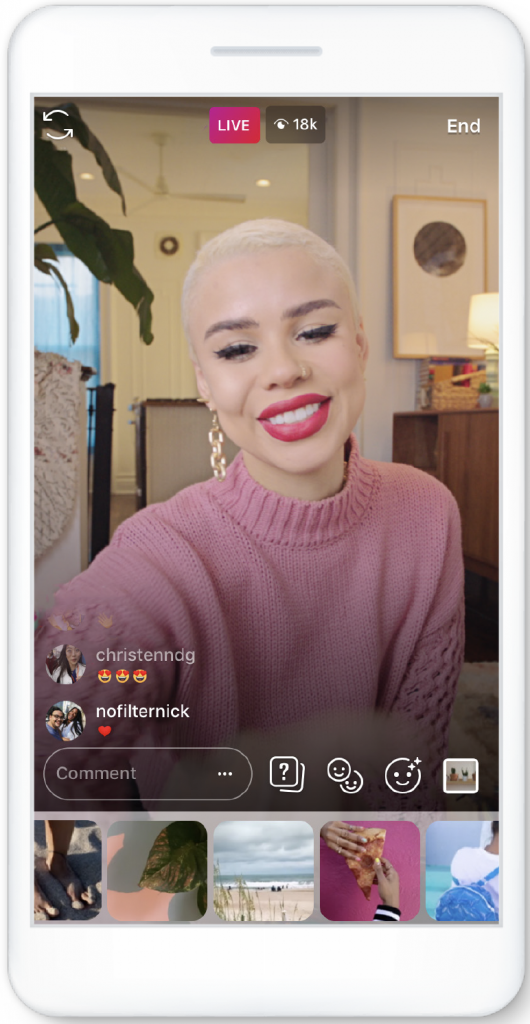
Instagram Live allows you to easily connect with your community in real time. You can use Live to maintain this direct line as people are increasingly isolated during the COVID-19 situation.
 

How to use Instagram Live to connect with people in the moment.


Getting started

To start a Live video, make sure you have a strong Internet connection. Swipe right from Feed to open the Stories Camera, then tap “Live” then “Start Live Video.” You can go Live for up to an hour, and you’ll see when new people join. The longer you stay Live, the more time your fans have to join. Your most engaged followers may receive a notification that you’re Live, and your Story will move to the front of their Stories bar at the top of the Feed.  Here’s some tips to help you before, during and after you go Live:

Before going Live

  • Test Instagram Live on a test account to make sure you’re familiar with the functionality and set-up.
  • Give followers advanced notice (try using the countdown sticker in Stories or posting on your Instagram Feed).
  • After your first live stream, try going Live at certain times during the day/week so your audience knows when to look forward to tuning in!
  • Make sure you have a strong Internet connection to keep the stream as high quality as possible.

During your Live video

  • Go Live with a creator or another Using “Live With” prompts a notification to your collaborator’s followers, so it’s a great way to reach new audiences.
  • Try a Live Q&A. Either ask for questions during the stream or use the Questions sticker in Stories to source questions beforehand.
  • Turn on comment moderation to facilitate a positive community experience.
  • If you are on iOS, try the Media sharing button (to the bottom right of your Live recording screen), which allows you to share any video or image on screen.

After going Live

  • Save your Live video and upload it to Stories.

TIPS AND IDEAS

→ Answer crowdsourced or customer questions

→ Host an Instagram Live Q&A about your products, and invite in members of the community to talk about the different ways they are using them during self-isolation.

→ Livestream your service.

→ Invite a brand ambassador or a creator who values your brand to help amplify your message.

→ Post process-style content, such as making your product or going behind the scenes of your business.


→ How to use Instagram Direct to answer questions and provide reassurance.

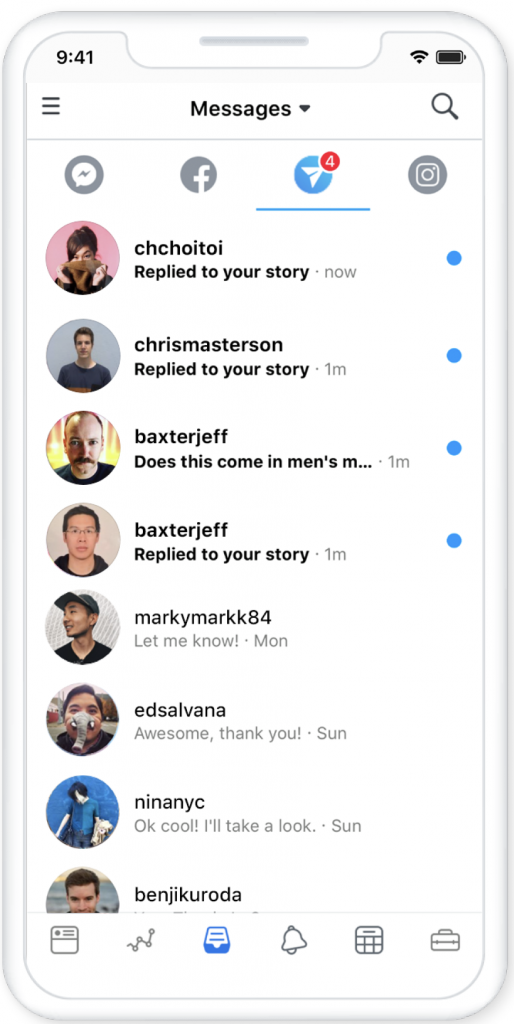
Instagram Direct is an easy way to communicate directly with customers, respond to questions and provide support. During this unprecedented time, people likely have many questions they’re asking you on Instagram. Instead of responding to each one in Instagram, try managing your Instagram Direct messages from your Facebook Page Inbox on mobile or desktop.

Getting started

You’ll need to connect your business Facebook Page and Instagram account. To do this, you need to have admin or editor access to the Facebook Page as well as the username and password of your Instagram account handy.

On mobile

  • Start by downloading the Facebook Pages Manager app from the App Store or Google If you’ve already downloaded the Facebook Pages Manager app, be sure to install the latest update.
  • Click the Inbox tab at the bottom of the screen, then click the Instagram Direct Tab.
  • If it’s your first time connecting your Instagram account, click the “Connect Account” button.
  • If you have previously connected your Instagram account, you’ll need to reconnect. Click the “Reconnect Account” button.How to use Instagram Direct to answer questions and provide reassurance.

On desktop

  • Start by navigating to the Inbox tab on your Facebook Page, then click the Instagram Direct tab.
  • If it’s your first time connecting your Instagram account, click the “Connect Account” button.
  • If you have previously connected your Instagram account, you’ll need to reconnect. Click the “Reconnect Account” button.
 

→ How to use Instagram Stories to foster authentic connections.

In this time of physical distancing, Stories can help you foster real connections with your customers. That’s because Stories allows you to interact with your community in authentic and engaging ways.

Getting started

  • Swipe right to easily access the camera to capture and share photos and videos to your Story. Pull down to upload photos and videos taken from your camera in the last 24 You can see what’s in your Story by clicking “Your Story” on the left of the bar at the top of the feed.
  • Drawing, text and stickers within Instagram Stories let you personalize your You can also tag other accounts, and verified accounts have the ability to add links to their Stories.
  • Your Instagram Story will appear in a bar at the top of People can also access your Story from your profile by tapping on your profile photo.
  • With Stories, interactivity is These tools help you engage with your followers:
    • Questions sticker: Answer community questions, or ask questions of your own.
    • Poll and Quiz stickers: Involve your audience in engaging ways.
    • Countdown sticker: Build anticipation for any moment your followers want to know (e.g., upcoming Q&A in Live).
    • View, reply-to and share Stories About You: Access these @-mentions through your activity tab.
How to use Instagram Stories to foster authentic connections.


TIPS AND IDEAS

→ Use the Questions sticker to find out what people want to hear from you about during this time.

→ Provide daily reflections and tips for customers.

→ Create a Highlight of your COVID-19 updates.

→ Create a Highlight featuring your most relevant products to make it easy for people to reference and find the things they need right now.

→ Create fun challenges for people to reshare in their stories and @mention their friends.


→ How to use IGTV to entertain and engage people.

With less options for things to do, people are looking for ways to be entertained online. IGTV is a way to go deeper with your audience by sharing longer videos around topics related to your business or your community’s interests.

Getting started

  • IGTV is full screen (vertical or horizontal), and videos can be up to 1 hour long. You’ll have your own channel on IGTV that gives you more opportunity to be discovered by new fans and When people open IGTV, they’ll see multiple channels filled with videos from creators and businesses they already follow on Instagram and others they might like based on their interests.
  • Make sure you publish original (not repurposed) content, and use sound, editing and graphics techniques to make your IGTV stand Engage the viewer in the first 3 seconds. Always use Feed Preview to increase your IGTV views. The new IGTV cropping tool allows you to select a thumbnail image so it looks good on your Instagram profile grid.
  • Also consider using the Series tool to share episodic themed IGTV content.
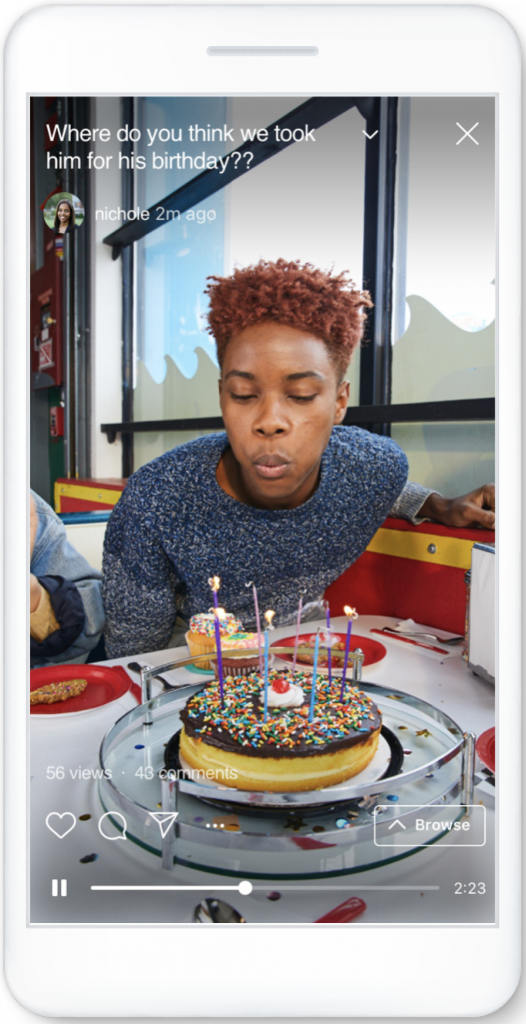
How to use IGTV to entertain and engage people.


TIPS AND IDEAS

→ Share updates on how you’re feeling and/or preparing your business during this time.

→ Share a content series featuring your products that people are finding most useful right now.

→ Provide challenges to your audiences and fans as they’re likely to have more downtime at home to participate in.

→ Consider creating a long-form Q&A video.


→ How to use Instagram Shopping to make it easier for people to shop.

With Instagram Shopping, businesses can make it easier for people to shop during this time. Businesses can direct customers to products that are relevant right now, show them different ways to shop and co-create by inviting people to post about their favorite products.

Getting started

Here are some suggestions for making the most out of your Instagram Shopping posts:

  • Make content actionable: Use Shopping Tags to highlight products that are featured in your content and provide as much information as possible upfront, so it’s easy for people to take If you are not a business that is already actively using Shopping Tags, now is the time to upload your Product Catalog so you can begin to use tags. Or, use content to help educate people on how they can shop for the things they need.
  • Own your brand story: In your own voice and visual aesthetic, communicate the various ways that people can still shop your products across several shoppable placements, such as Shoppable Tags in Stories and in Feed. Be sure to reply to comments and Direct Messages from people in the voice that is most on-brand to your business while remaining cognizant of the sensitive time period.
  • Create full-funnel strategies: Businesses who are on Instagram Checkout can develop brand concepts to reach new people and drive instant For example, use Shopping Tags to add value with utility- driven digital experiences. Or, provide value through entertaining content as people are spending more time on their phones. Naturally weave in key products that matter most to drive transactions in-app.
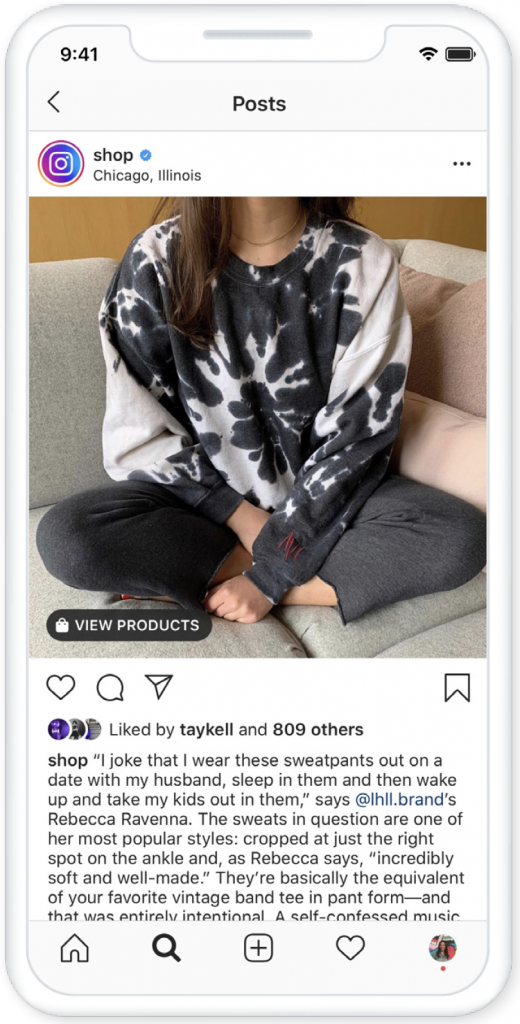
How to use Instagram Shopping to make it easier for people to shop.


TIPS AND IDEAS

→ Curate products that align with what is happening in the world currently into shoppable Stories in order to provide followers relevant content and drive action. Use the Stories Highlight tool to pin this shoppable content to your profile after your Story expires.

→ Co-create user-generated content with your followers. Invite them to post about their favorite product of yours, then choose your favorites and post to your account using Shopping Tags.

→ Invite Creators to curate a kit of their favorite products to share across Feed and Stories. Be sure the content includes a clear CTA directing people to your Profile Shop for more information on the products featured.


Contact us and see how The Social Group™ can help elevate your social media and digital presence.


Marketing - COVID-19, Social Media Marketing

Social Media Marketing During a Pandemic

April 9, 2020

Social in a Time of Corona

Woah, it’s heavy out there! Am I right? The entire world is affected by COVID-19. A lot of the things we take for granted in our everyday lives are closed or off-limits, creating a new normal. As Creators, we must use this opportunity to make people smile, and to give them a break from the weight of hourly news updates. As Account Managers, we must continue to steer the ship and maintain brand awareness, without being tone deaf. So where is the line? What is too cute and what is too somber? The whole world is in unchartered territory, but let’s try to make the best of it.

Stay Apart of the Conversation

If you weren’t deemed essential, you are home and probably glued to social media. Between Instagram lives, family TikToks, Facebook fact checking, and real time updates from Twitter, there’s no shortage of content to consume. More than ever it is important to stay apart of the conversation. Throw your old social strategies in the trash, wash your hands, and start anew.

People don’t want to have promos stuffed down their throats. They want to be engaged. They want a meme to send to their friends, or a video that tugs at their heart strings, really just a moment that feels normal. Focus on engaging content that will make people feel like we are all truly in this together, feeling the same way.

Some ideas to get your creative juices flowing:

-Check-Ins from Staff – transparency is very appreciated right now

-Pick a Quarantine House – use people relevant to your brand

-Bingo – a fun way to keep your brand on people’s minds

-Which Character Are You?

-This or That Instagram Story Voting


Mind Your Tone

It is critical to avoid coming off tone deaf in your posts. The world is hurting, and though it may not have affected your house, it has affected your community. Do not make light of the effects of the coronavirus. It should go without saying, but do not joke about death, illness or unemployment. Remember how sensitive the world was before this pandemic? Multiply that by 100,000.

This is where “is this too cute or too somber?” comes in. Stay away from too cute to avoid sounding tone deaf, and avoid too somber because people already get that from the news. Find the middle ground that best suits your brand. Be mindful of the latest coronavirus updates to avoid posting old news or insensitive content. If you are recycling old images or videos, be cognizant of our new normal that includes social distancing, being away from friends and family, staying indoors, etc.

Engage With Your Community

There is a thin line between using this time for personal gain (good PR) and helping your community, so it is important to stay authentic. A good way to use your platform is by asking your followers and your network to help your community. Many essential workers need masks, senior citizens need groceries, and a lot of people are now jobless and in need of financial aid.

Don’t be afraid to document and share your community outreach. Making sure to stay authentic is important because the internet is quick to sniff out (and berate) a phony. If your intention is just to garner some good PR, they’ll know. Rest assured that when this is all over, people will remember the brands that stepped up.

We’re in This Together

As marketers, we have our own community and we are in this together. We are all navigating through events that were canceled and sales that are dropping, so we have each other to lean on. There are no competitors right now. Don’t be afraid to reach out to forums and Facebook groups with concerns about content. Stay safe and stay healthy, we will get through this.


Carli Cortez


Marketing - COVID-19, Social Media Marketing

Social Media Tips During the Coronavirus (COVID-19) Pandemic

April 7, 2020

Social Media Tips During the Coronavirus (COVID-19) Pandemic


The coronavirus (COVID-19) pandemic has impacted nearly every single aspect of life throughout the world. Social distancing and the closure of businesses has significantly altered our economy and the way we communicate. If you or your team are managing social media accounts, it is important to remain cognizant of tone, messaging and the hardships many are currently facing. Equally as important is to maintain a connection with your audience as Facebook and Instagram usage have both increased by 40%.

So how do you balance being sensitive to consumers’ economic hardship and needing to generate revenue for the business? The Social Group™ believes it really depends on your relationship with your audience, the products or services you’re providing, and what the brand is doing to altruistically help the community. Let’s take a look at the NBA’s Miami Heat and some other brands as examples of the type of content and messaging they’re pushing out on social media channels.


  • Current B2C Relationship


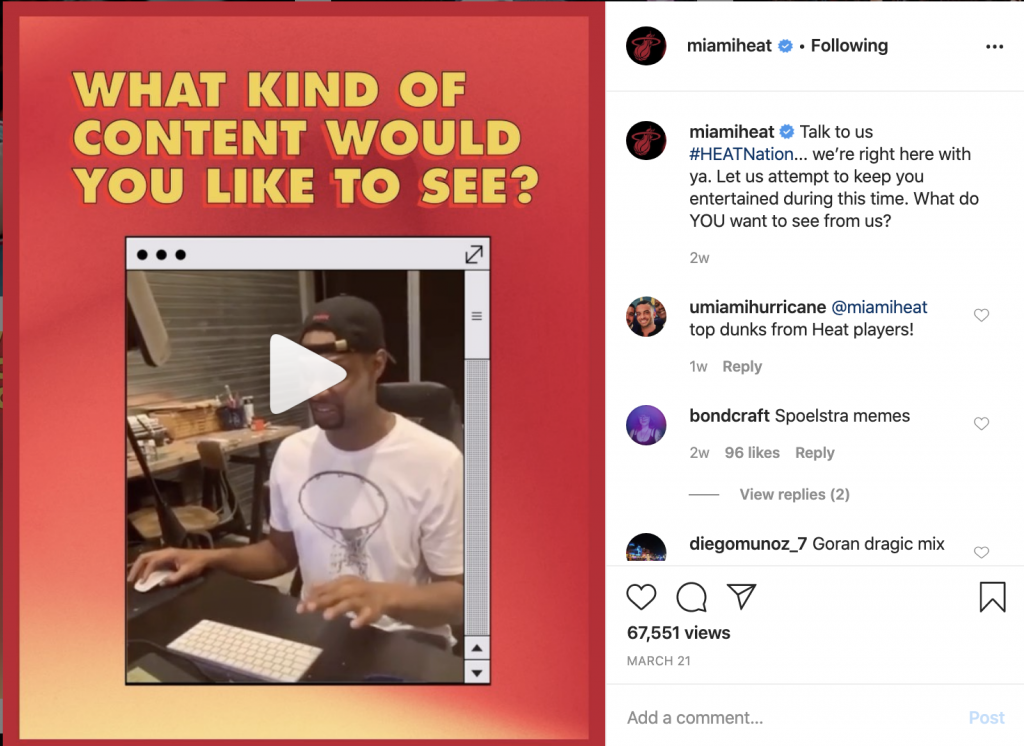
The Miami Heat have traditionally maintained a very positive relationship with their fans. Taking a surface layer look, their social media engagement is high, overwhelmingly positive and supportive. The content being published ranges from highlights and replays of games to bringing viewers behind the scenes into players’ homes and directly asking their audience on the type of content they’d like to see. Though it may seem obvious, asking your audience what they want is often overlooked. Sometimes social media managers and marketers try so hard to figure out what they think their followers want to see. Oftentimes, it’s better just to ask directly while generating positive engagement and feedback.


Current B2C Relationship


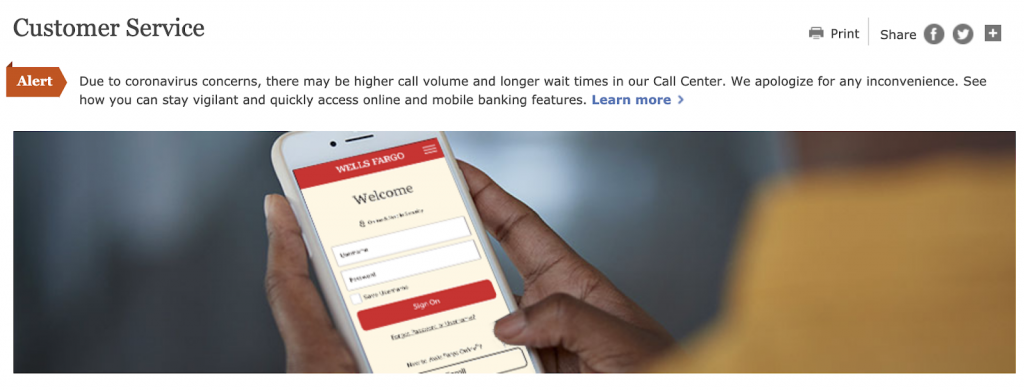
The closure of businesses from offering services and products has caused several other problems: communication. Several companies have been experiencing massive surges in wait times for those contacting official call centers. No company is perfect and it’s unreasonable to expect an unlimited number of support staff to be available. 

Wells Fargo and E*Trade have put out messaging alerting their customers and clients to expect longer than normal wait times.


How do you balance being sensitive to consumers’ economic hardship and needing to generate revenue for the business?


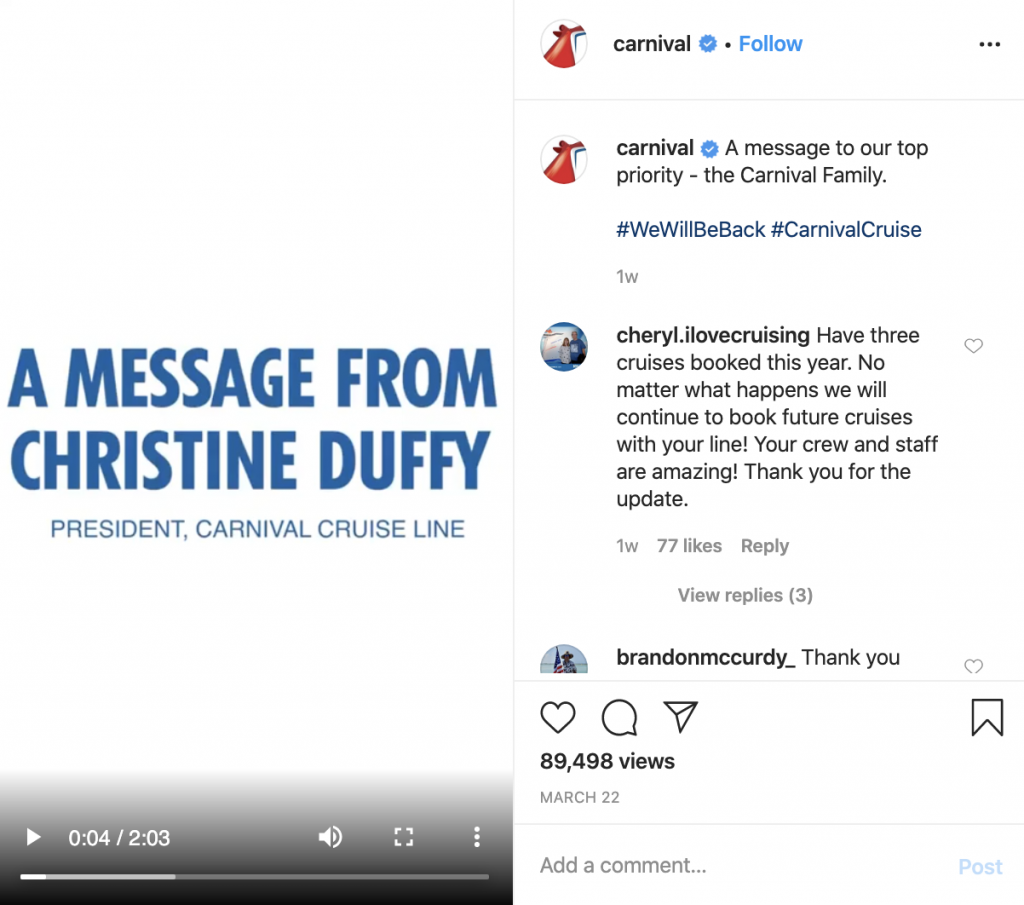
Carnival Cruise Lines, one of the most impacted brands during the COVID-19 pandemic, published a simple, straight-to-the-point video from Christine Duffy, President of Carnival Cruise Line. In the video, Duffy acknowledges the long wait times while offering apologies and reassurances that they are listening and doing everything they can to help customers receive refunds. It’s a message that requires very little effort but pays off in a big way. Customers want to feel that they are being heard and acknowledged. Although things may seem to be getting worse before they get better, this was a small but important win for Carnival Cruise Line’s image.


Carnival Cruise Lines, one of the most impacted brands during the COVID-19 pandemic, published a simple, straight-to-the-point video from Christine Duffy, President of Carnival Cruise Line


  • Products and Services


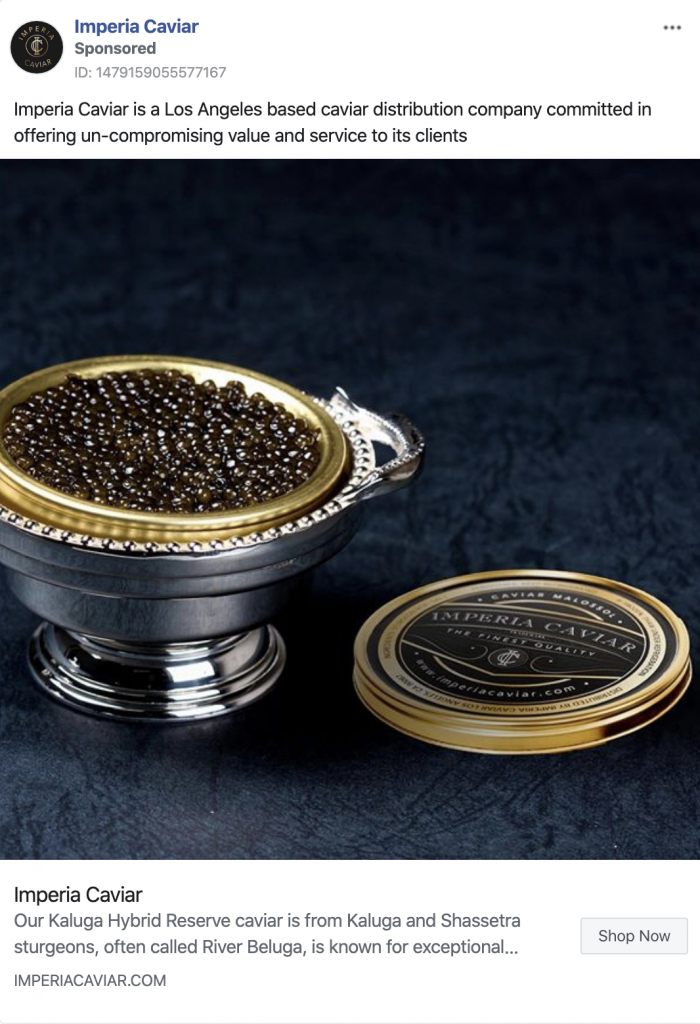
The Social Group™ recently came across an ad from a caviar brand promoting the sale of expensive caviar ranging from $169 to over $1,300. Perhaps it’s not the best time to be promoting an expensive luxury good while jobless claims in the United States have soared to over 10 million. But is it wrong? It really depends on your audience targeting. If you’re marketing a product to your ideal audience, that you believe there is want and need for (supported by your own data analysis), then go for it. After all, you still need to generate ROI and revenue in order for your company to survive. So long as you’re mitigating negative feedback, sharpening your target audience, and monitoring your ROAS (return on ad spend), then it could very well be worth it.


Caviar brand promoting the sale of expensive caviar ranging from $169 to over $1,300


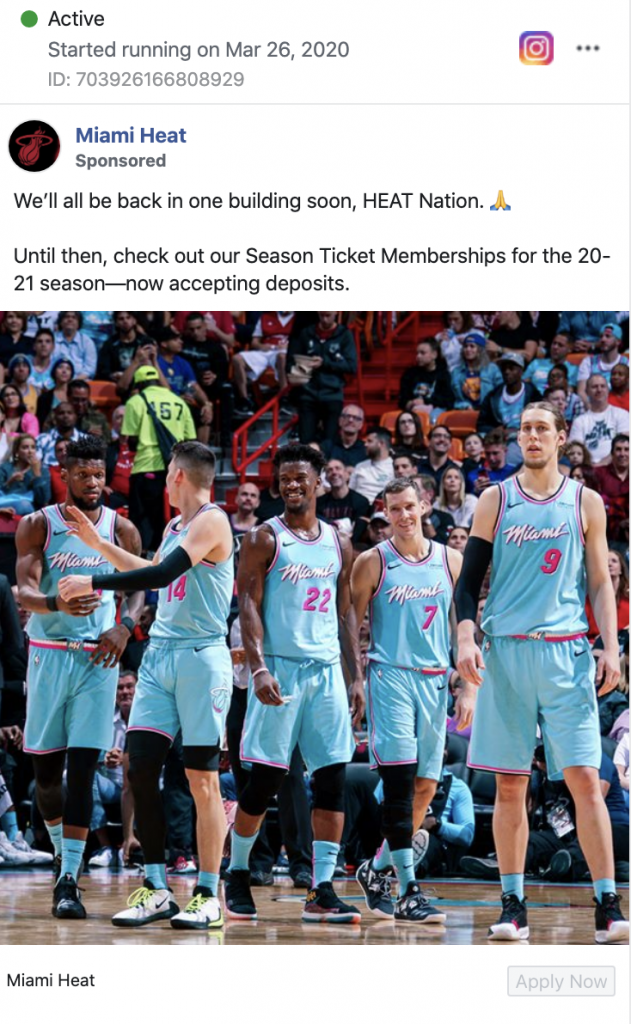
Taking another look at the Miami Heat, they too are actively promoting the sale and renewal of season tickets. And that’s during a global pandemic with the current NBA season being cancelled!


Taking another look at the Miami Heat, they too are actively promoting the sale and renewal of season tickets. And that’s during a global pandemic with the current NBA season being cancelled!


Although there are certainly some negative comments in response to this campaign on Facebook and Instagram, the Miami Heat were as sensitive and self aware as possible. The brand is acknowledging the current situation which is extremely important. Brands should avoid sounding tone deaf at all times. A simple acknowledgement of the pandemic, while wishing everyone well and offering hope for the future is key. The messaging in this ad subtly provides hope and comfort that everything will be okay by promoting next year’s basketball season even though the current one has been cancelled. 

Gulfstream Park, a thoroughbred horse racing venue with outdoor shopping, dining and entertainment options, recently shut its doors to the public and no longer allows thousands of fans to watch live racing. A fun and engaging way they chose to interact with their fans through social media was creating a “jockey bracket tournament”, similar to the NCAA’s March Madness. It proved to be one of the most successful campaigns in the past two years for Gulfstream Park.


Gulfstream Park, a thoroughbred horse racing venue with outdoor shopping, dining and entertainment options, recently shut its doors to the public and no longer allows thousands of fans to watch live racing.


  • Community Outreach


A good way to stay engaged with your audience is to establish a community outreach campaign. Publix Supermarkets for example announces senior shopping hours. Since the coronavirus (COVID-19) pandemic is particularly dangerous to the elderly, Publix wanted to create a shopping experience that was as safe as possible. According to the CDC, individuals over the age of 65 are at an increased risk. Publix is one of the most recognizable brands in the South Florida market and they’ve been able to increase their positive standing in the community throughout the pandemic by helping consumers.

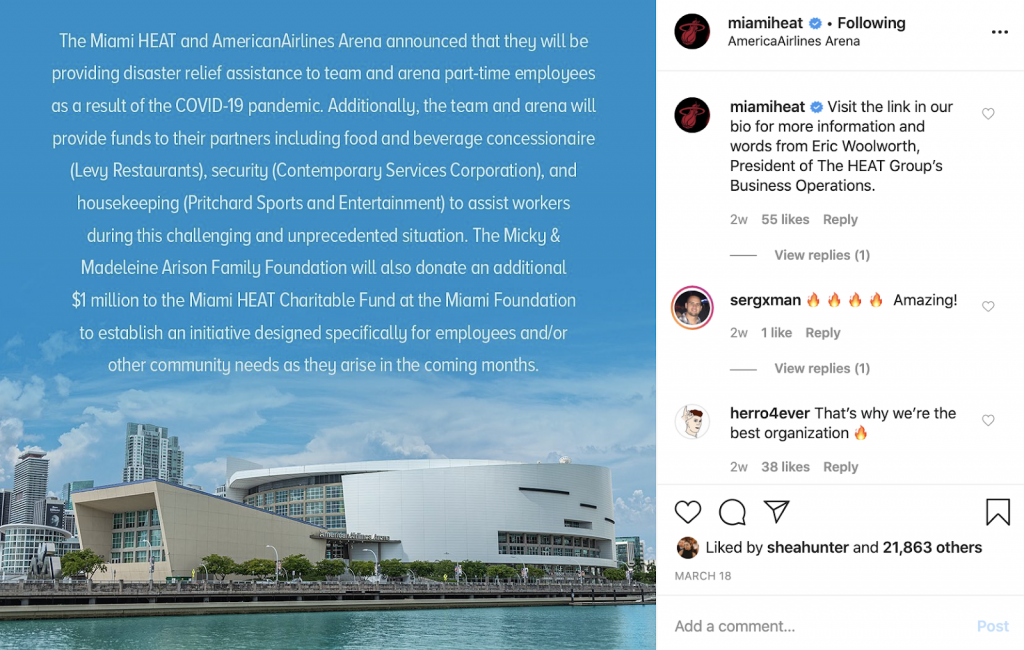
The Miami Heat’s HEAT Charitable Fund also donated $1 million geared towards aiding employees and the local community for the foreseeable future. The Miami Heat are a strong example of a brand finding a balance between maintaining revenue and the need to carry on as a business while being sensitive to the community and current health crisis.


The Miami Heat are a strong example of a brand finding a balance between maintaining revenue and the need to carry on as a business while being sensitive to the community and current health crisis.


Some brands have debated on whether to halt marketing altogether, to pivot their messaging, or to focus on community outreach. While the current health crisis’ end is uncertain and no one knows for sure when things will return to “normal”, The Social Group™ believes social media marketing is a powerful and relatively cost-effective way of staying engaged with your audience. Eventually, customers will be welcomed back and if your brand has been quiet for weeks or months, you could miss out on a much needed rebound in business. Our advice is to find fun, interesting, helpful ways to stay connected and top of mind. 
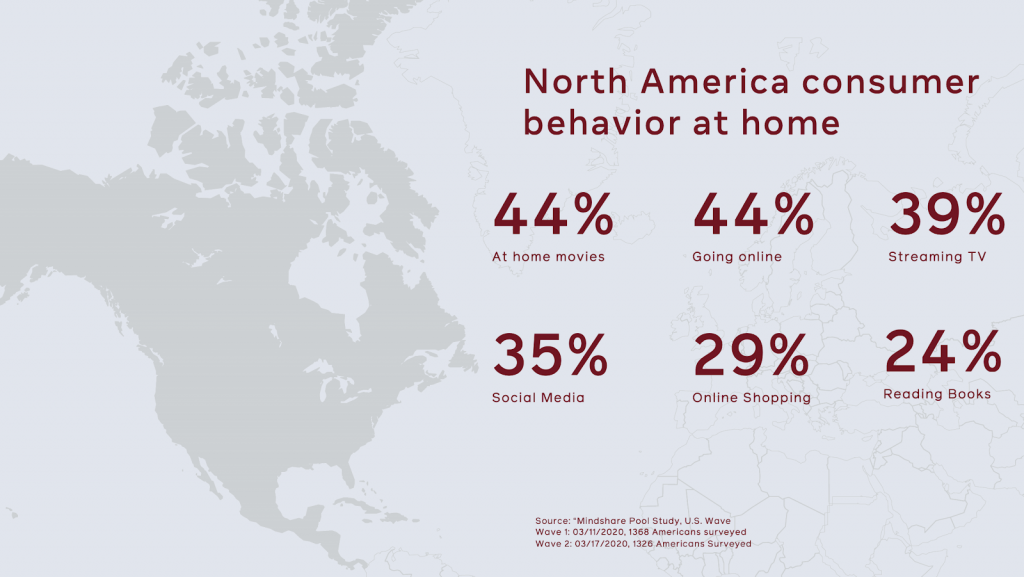
As a social media partner agency of Facebook, The Social Group™ has access to certain reports and assets that aren’t published to the public. One featured graphic can be seen below. Approximately 2,700 Americans were surveyed regarding their consumer behavior at home during the COVID-19 pandemic. As probably expected, the great majority is digitally active, whether it’s shopping online, streaming TV or using social media.


Approximately 2,700 Americans were surveyed regarding their consumer behavior at home during the COVID-19 pandemic. As probably expected, the great majority is digitally active, whether it’s shopping online, streaming TV or using social media.


While every brand and business is different, these are challenging times faced by us all. If you have questions about how best to strategize your social media or overall digital marketing strategies, feel free to reach out to us. The Social Group™ is a Facebook and Google partner agency and we are also Facebook Blueprint certified.

Marketing - COVID-19

A Look at Big Brands’ COVID-19 Digital Marketing Strategy

April 5, 2020

The coronavirus disease 2019 (COVID-19) has no doubt caused significant disruption, hardship and uncertainty throughout the globe. While the vast majority of businesses and organizations are temporarily closed, our digital connection seems to be stronger and more vital than ever. Imagine for a moment what our world would look like twenty years ago without the advanced level of communication technology we have today.

The importance of maintaining dialogue with clients cannot be overstated. Whereas many brands and organizations have halted marketing and media spend for obvious reasons (e.g., Carnival Cruise Lines), many others have pivoted their brand messaging in light of the COVID-19 pandemic.

T-Mobile

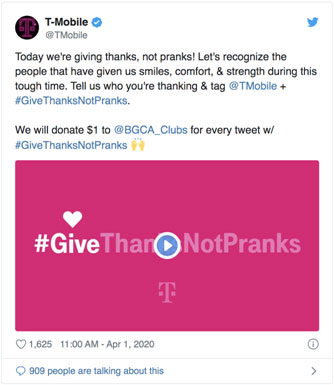
T-Mobile loves a good April Fool’s joke. Of course, this year it’s a little different. The wireless carrier went from unlimited “plans for pets” to donating $1 to the Boys and Girls Clubs of America for each tweet with the hashtag #GiveThanksNotPranks. In addition, phone manufacturer OnePlus stated it would pledge $50,000 towards the effort while the Seattle Mariners of Major League Baseball helped out by retweeting T-Mobile’s message.

T-Mobile COVID-19 Marketing Strategy

Audi, Taco Bell and West Elm

All three corporations have begun offering free video conference backdrop images. Zoom, the video conference giant, has seen daily meeting participants surge from a maximum of 10 million in 2019 to over 200 million. So it makes sense for brands to try and leverage some free publicity.

Audi, Taco Bell, West Elm: COVID-19 Marketing Strategy

QuickBooks

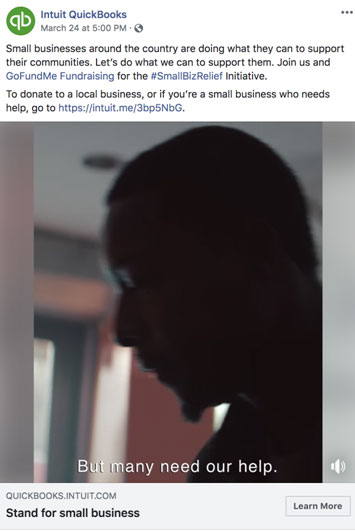
QuickBooks, the software maker, was originally running with a chic 80s-themed campaign featuring Karate Kid and Ghostbusters stars. After hitting the pause button on that, QuickBooks has published a new 30-second clip with a voiceover stating “QuickBooks salutes the grit and determination of those who work for themselves – they’re the backbone of our economy and in these challenging times, they’re adapting to support their communities.”. It closes out asking viewers to donate through a created by parent company Intuit.

QuickBooks: COVID-19 Marketing Strategy

Bud Light

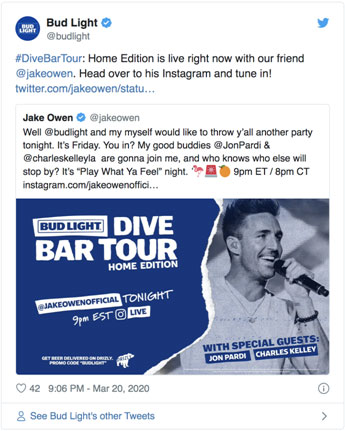
Another “COVID-19 trend” are virtual concerts. Bud Light is sponsoring the “Bud Light Dive Bar Tour: Home Edition” with the country music star Jack Owen who filmed the performance from his home. Streamed on Instagram Live, the virtual concert was accompanied with subtle branding: “Live at the @budlight Dive Bar Tour: Home Edition: Come have some beers and hang with us.

Bud Light: COVID-19 Marketing Strategy

Facebook & Google

It’s not just consumer brands that are pivoting. Major digital platforms are also doing their part to help out consumers and clients. Facebook is ready to donate $100 million to small businesses. The “Boost With Facebook” campaign looks to provide support to over 30,000 small businesses in 30 different countries.

“We’ve listened to small businesses to understand how we can best help them”, Sandberg said on Tuesday. “We’ve heard loud and clear that financial support could enable them to keep the lights on and pay people who can’t come to work.”

Google is pledging over $800 million to support small- and medium-sized businesses, health organizations and governments, and health workers. Some of the commitments included in the $800 million aid are:

  • $250 million in ad grants to help the World Health Organization (WHO) and 100+ government agencies provide critical information on how to prevent the spread of COVID-19
  • $200 million investment fund that will support NGOs and financial institutions around the world to help provide small businesses with access to capital.
  • $340 million in Google Ads credits available to all SMBs with active accounts over the past year.
  • $20 million in Google Cloud credits for academic institutions and researchers to help study potential therapies, vaccines, track critical data and identify new ways to combat COVID-19.

Facebook & Google: COVID-19 Marketing Strategy

While every brand and organization is unique, the above examples should provide solid reference when crafting sensitive messaging. The Social Group™ will be sharing relevant content weekly to help our clients, partners and industry stakeholders navigate the digital marketing ecosystem and the implications caused by the COVID-19 pandemic.

Content - Flash

The Art of Flash Content: Tips for Capturing Content at Annual Events

April 3, 2020

Carli Cortez

You have less than 12 hours to gather enough content to last you 365 days, GO. No pressure! Keep in mind a year full of holidays, national days, celebrity shout outs/birthdays, and make sure to stay on brand. So…a lot of pressure.

Take a deep breath and make a plan, it’s the only way. I’ve spearheaded social output for many large events, so maybe these pointers will help you sleep the night before.

Create a shot list.

Planning your attack on an event should always include a shot list. If you aren’t provided a run of show in advance, a generic idea of what content you need to capture should suffice. Know what national holidays your brand will recognize over the next year and keep those in mind when capturing day of content.

The Art of Flash Content: Tips for Capturing Content at Annual Events

Relay your content needs to your photographers/videographers.

You can’t post iPhone pictures for 365 days leading up to the next event, so make sure to include your photo team in your plan. Have a face-to-face meeting the morning of the event so it is fresh in their minds. If you know you need to post for the 4th of July, make sure to tell them to keep their eyes open for photo ops that include American flags. If your brand cares about National Friendship Day, make sure they’re looking for groups of friends.

Utilizing Flash: Tips for Capturing Content at Annual Events

Know your sponsors.

Most likely your event will come with a list of sponsors or keynote speakers that require a social shout out. It is very important to know the contractual obligations for each sponsor – how many posts do they get? Which social platforms do they need to be posted on? Do they require approval by the brand/speaker? Does their post need to go up before the event or day of?

Knowing their handles and hashtags ahead of time will make satisfying sponsor obligations a breeze. Also, look at the content they’re posting to get an idea of what will work for both brands. Include your photo team here as well. If you need photos of brand activations, an iPhone picture might not be good enough. Keeping your sponsors happy will bring them back next year.

Pack a snack.

The Jewish mother in me won’t let me write this without saying, “Don’t forget to eat!” Snacks are essential. If you find the time to sit down for lunch or dinner, good for you! You deserve it. But if you don’t want to sacrifice a moment of potential viral content for a meal, pack a snack. My go-tos are granola bars, trail mix and fruit, but don’t be afraid of stuffing a PB&J (or three) in your bag.

Flash Tips for Capturing Content at Annual Events

Wear comfortable shoes/clothes.

You’ll be walking, maybe even running, from one side of the event to the other A LOT. We all want to look our cutest in strappy heels and a dress, but we opted to be account managers and we hustle. Sometimes getting the perfect shot means bending, crouching or climbing and a little dress won’t cut it. More often than not you can find me in a jumpsuit and flats on event days, cute but practical.

Tips for Capturing Content at Annual Events using Flash

Breathe.

You’re going to feel pulled in a million directions, because you probably are. Every department wants their story told, every sponsor wants their company tagged, every attendee wants their picture taken. As long as you don’t forget what your client wants to see, stay on brand, and include all necessary sponsors, you’re good! You are the captain now. This is your account and your rodeo, grab the reins.

Instagram Marketing, Social Media Advertising, Social Media Marketing

Social Media Ads: Basics of Facebook Boosting & Instagram Promoting

April 2, 2020

Social Media Ads: The Basics of Facebook Boosting and Instagram Promoting

As organic reach continues to decline across Facebook and Instagram due to ever changing factors in their respective social media ads algorithms, social media advertising has become more and more important to ensuring that the content being developed is actually seen, heard and engaged with. Whether you are investing tens of thousands of dollars in creating custom content such as video or photo shoots, or investing your own time shooting your own imagery, promoting your message with paid support via Facebook and Instagram ads ensure that your investment is gaining traction and return.

In this article, we’ll discuss the differences between boosting and promoting Facebook and Instagram posts, their pros and cons, along with a dive into highly targeted custom social media ads.

Boosting a Facebook Post: The Basics

Boosting a Facebook post is a quick and easy way to get more reach, impressions and engagement. Depending on the type of post, there are different options for how to get the best return and maximize your spend efficiency. Boosting an image may seem straightforward depending on your level of expertise, but there are some important nuances that could trip you up if you’re not careful!

Boosting a Facebook post is a quick and easy way to get more reach, impressions and engagement.

The first and most important step is Audience Targeting. Here are some basic pre-set audiences you can target:

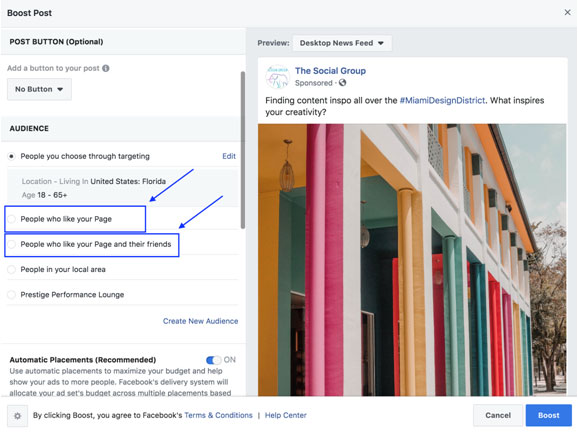
Boosting a Facebook Post: People Who Like Your Page

Selecting this audience will deliver your post to only those who currently follow your page. If you have a specific message or are in a niche market, using this audience is a quick and easy way to ensure your followers are actually seeing your content. However, keep in mind the size of your following. If you’re following is small, you may want to consider another option which could be the “People Who Like Your Page and Their Friends” option.

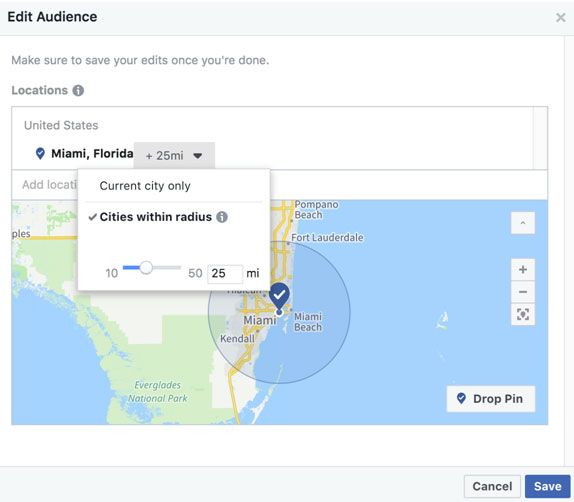
When selecting either of these options, you will be able to further target your selected audience by location and age. One example of why you may want to edit the location and age is if you’re promoting a local promotion or event. If you have an audience that lives throughout the United States, chances are people living in Seattle or Los Angeles wouldn’t be coming for a promotion or small event in Miami or Philadelphia. Selecting the Edit button will allow you to alter the location of where your boosted ad will be served. For our purposes, we’ll select Miami, Florida. You will then have the option of expanding the radius or narrowing the audience down so the ad is served only within that city.

Boosting a Facebook Post: People Who Like Your Page

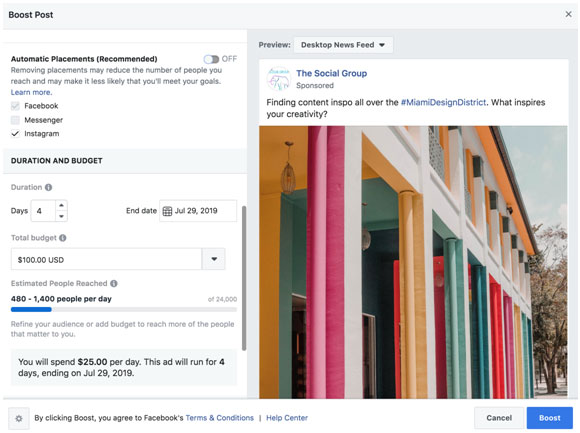
The last two steps are to determine the placement of your ad. Leaving this option on the default Automatic Placement will serve the ads on Facebook, Instagram and Facebook Messenger (depending on the type of post). If you’d like to run the boosted post on only Facebook or Instagram, for example, simply click the ON button and check or uncheck whichever platform you’d like the ad to run.

The last two steps are to determine the placement of your ad. Leaving this option on the default Automatic Placement will serve the ads on Facebook, Instagram and Facebook Messenger (depending on the type of post).

The final step is to determine your budget. The great thing about this feature is that you can determine an estimated number of people reached. So depending on how many people you’d like the ad to potentially reach, you can lower or raise your budget. Boosted posts typically default at a 10-day run time, so your ad will run over the course of ten days. Again, depending on the goals and objectives of your ad, this can be changed. If you have a sale that only lasts for three days, you would want to change this setting.

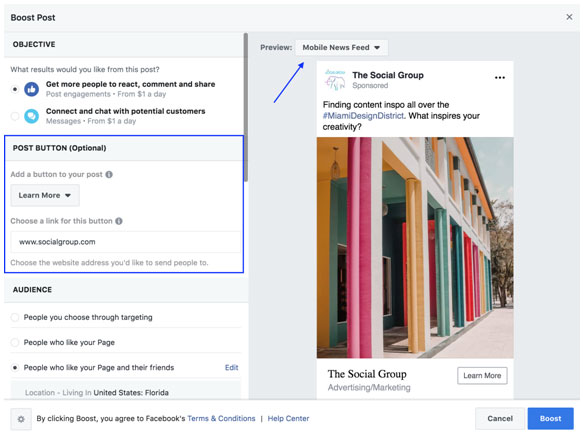
Lastly, you can input a call-to-action (CTA) in your post such as your website. Simply scroll to the top to “POST BUTTON” and select an option from the dropdown. Once this is done, you can also view how the ad will look based on different platforms including Facebook Desktop, Facebook Mobile, Instagram and Instagram Stories.

Lastly, you can input a call-to-action (CTA) in your post such as your website.

Now you’re ready to boost! Simply click the Boost button and you’re ready to rock.

Boosting a Facebook Post: People You Choose Through Targeting

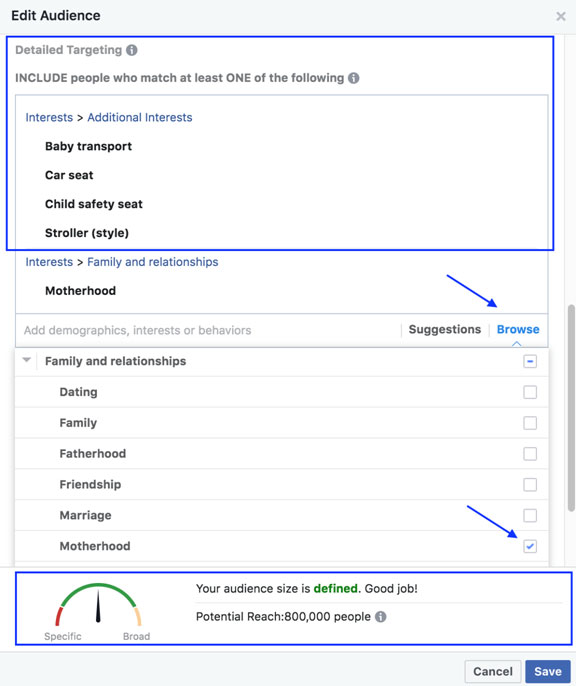
This option gives you the ability to pinpoint your target based on gender, age, location, demographics, interests, and behaviors. For example, you could target mothers aged 25 to 45 who live in the Pacific Northwest that are interested in strollers. Pretty narrow right? The great thing is if you have trouble finding interest categories or demographics, there’s help. Selecting the Browse button will provide you a dropdown menu of different categories to choose from. If the ad is for strollers, but you also sell car seats and other child safety products, you can select Suggestions, and Facebook will provide a list of relevant targeting categories you can add to the target audience.
Boosting a Facebook Post: People You Choose Through Targeting


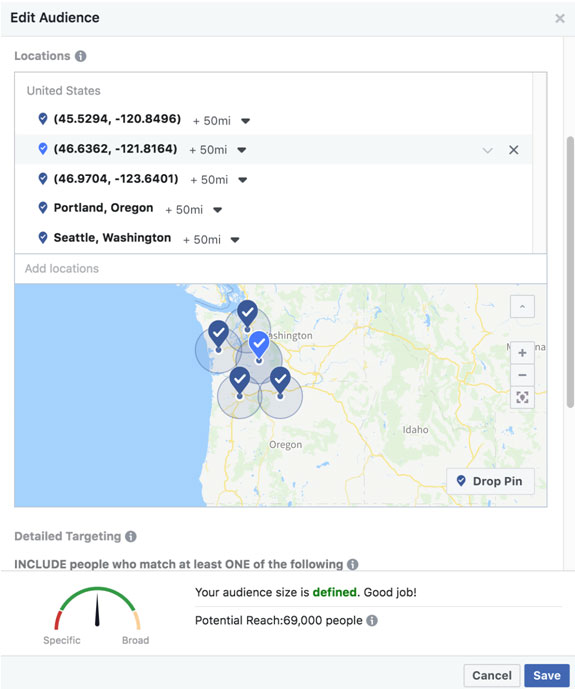
Be sure to look at how your audience size is defined. If it’s too narrow, consider adding more interests or expanding the location of where your ad will be served.

If you’d like to expand upon the location of where the ad is being served, you can either type in the city or demographic area, or you can select the Drop Pin button at the lower left of the map. This allows you to select your own location, and select up to a 50 mile radius if you choose.

Be sure to look at how your audience size is defined. If it’s too narrow, consider adding more interests or expanding the location of where your ad will be served.

When you’ve defined your target audience, simply click Save and you’re ready to go.

The same steps can be repeated in other audience setting categories. If you want to target People Who Like Your Page and Their Friends, it will do just that. If you’d like to create an entirely custom audience, simply select Create New Audience, input your targeting parameters and click Save.

Promoting an Instagram Post: The Basics

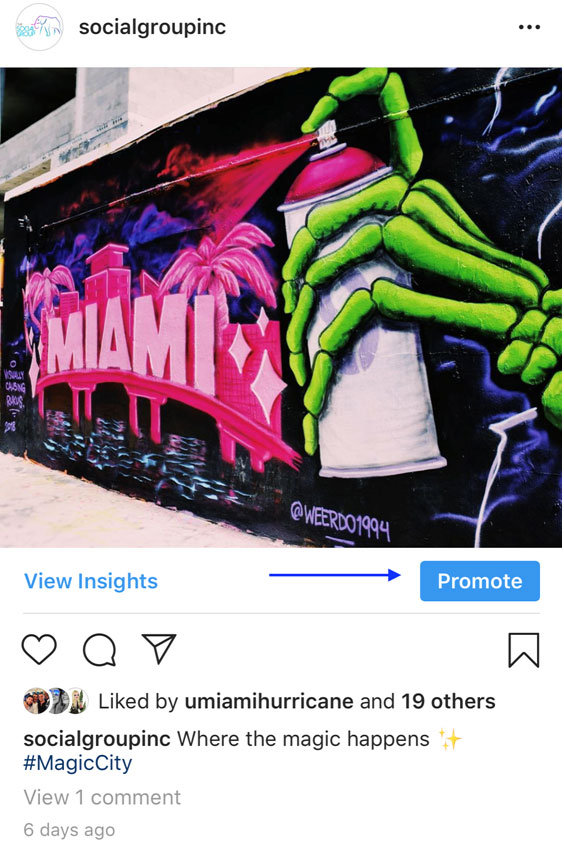
What Facebook calls Boosting, Instagram calls Promoting but it’s essentially one in the same. Promoting an Instagram post is a little more straightforward and simpler to enable. The first thing you’ll want to do is identify which post you want to promote and tap the Promote button on your smartphone.

Promoting an Instagram Post: The Basics

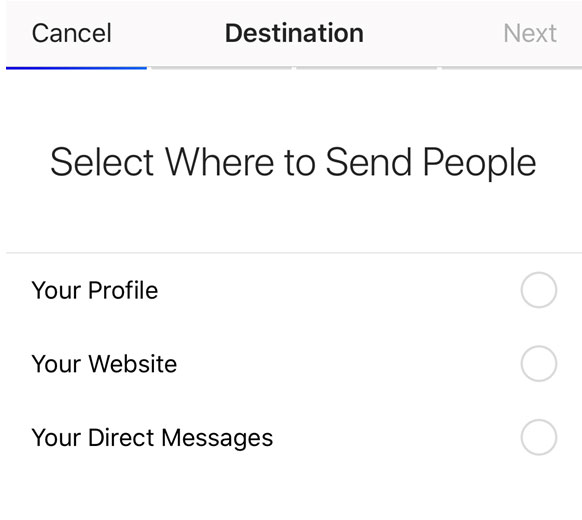
The next step will be to determine where you want to direct people to who are seeing your promoted Instagram post. These calls-to-action (CTAs) include directing people to visit your Instagram profile, a specific website, or to message your Instagram account directly.

The next step will be to determine where you want to direct people to who are seeing your promoted Instagram post.­­

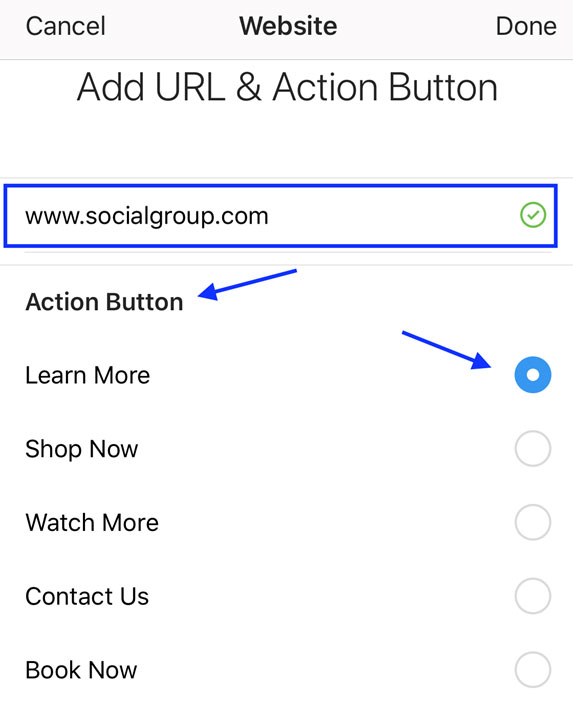
If you’re trying to build followers, or would like to focus specifically on your Instagram account, you would want to select the first option. If you’d like for users to visit your website or any other particular site such as a landing page for ticket sales, select the “Your Website” option and input your URL. You will also be able to choose which CTA you’d like.

If you’re trying to build followers, or would like to focus specifically on your Instagram account, you would want to select the first option.

Promoting an Instagram Post: Audience Targeting

The next step is determining whom you want to target. The default setting will target your current Instagram followers and other accounts that resemble your followers based on accounts they follow and interact with. You also have the option to create your own custom audience.
Promoting an Instagram Post: Audience Targeting

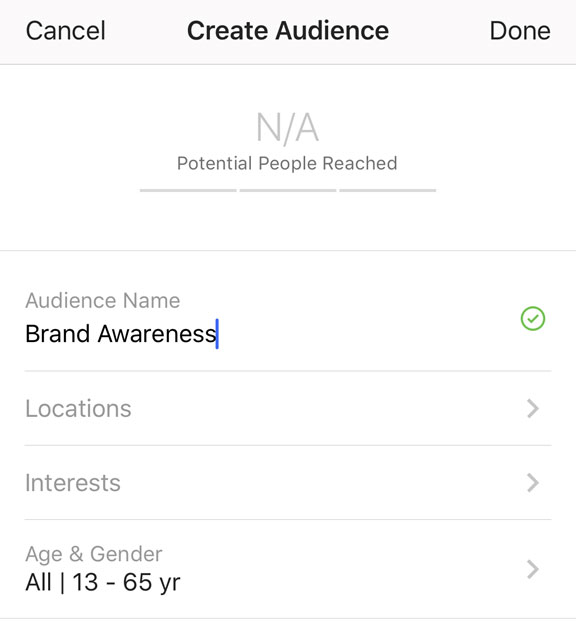
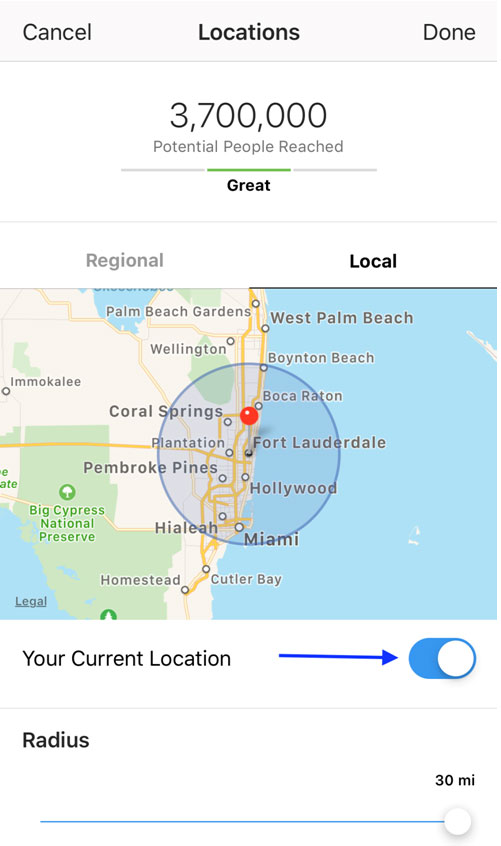
Enter the name of your new custom audience so that you can use it for additional promotions if needed. For locations, you have two main options: Regional and Local. For Regional targeting, simply add various cities, regions, or countries you want to target. When it comes to Local Targeting, you have a few more options to work with. Local Targeting for Instagram will automatically default to using your current location. You also have the option to expand the geographic radius from one mile up to 30 miles. If you’d like to use a more specific location, tap the button next to Your Current Location.

For locations, you have two main options: Regional and Local.

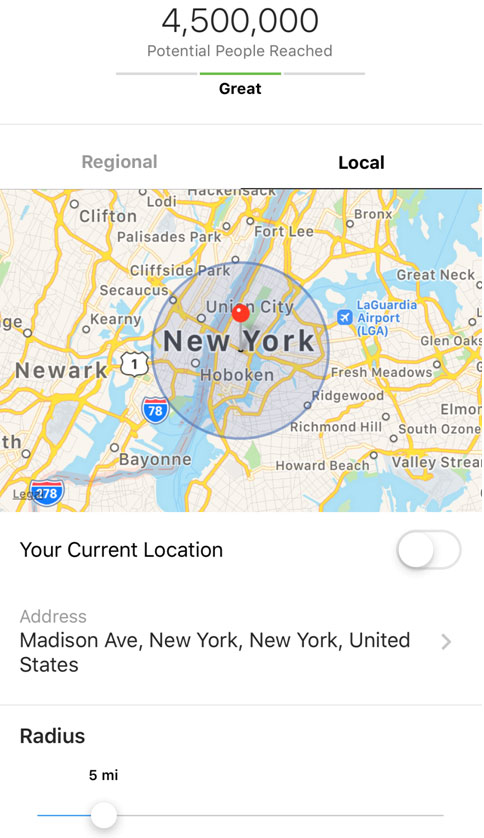
You will now be prompted to enter a specific address in order to target a custom location. For example, if we wanted to target Manhattan, we could simply input a high traffic area such as Madison Avenue, slide the radius scale to determine the most appropriate geographic area we want to target in New York City and select Done.
For example, if we wanted to target Manhattan, we could simply input a high traffic area such as Madison Avenue, slide the radius scale to determine the most appropriate geographic area we want to target in New York City and select Done.
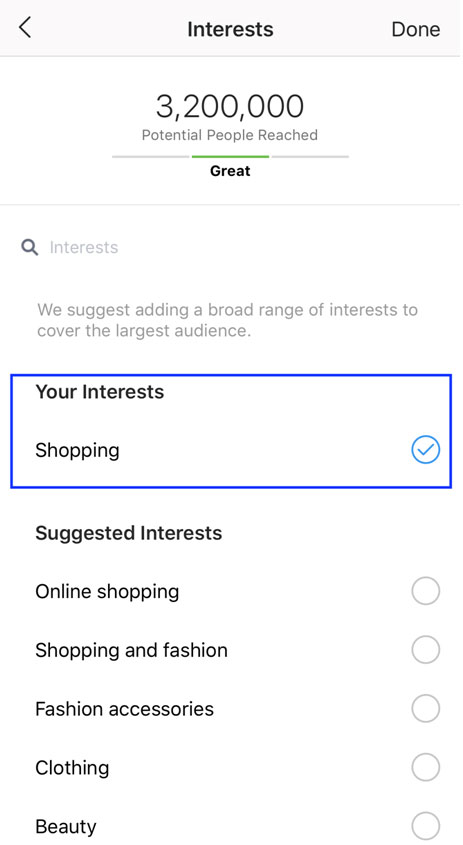
Once you’re done with selecting your geographic location, you can begin inputting which interest categories you want to target. Instagram will provide a short list of suggested interests, but feel free to type your own. For example, if we’re targeting shoppers in Manhattan, we may want to type in “shopping” as an interest category. This will in turn generate an automatic list of relevant interest categories that you can select to further bolster your overall audience.

Once you’re done with selecting your geographic location, you can begin inputting which interest categories you want to target.

Once you’ve created your Audience Name, your target geographic location and now interests, it’s time to select age and gender. Simply tap whether you want to target Male, Female or both and use the sliding scale to determine the age range.

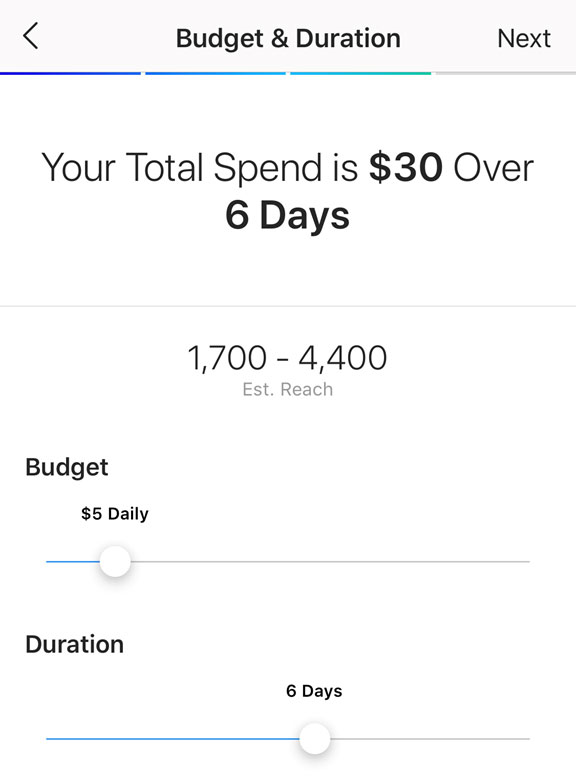
Now it’s budget time! Be careful when selecting your budget because the number reflected is what you will spend daily, not for the total campaign. Determine the total budget you want and how long you want to run the ad for. Let’s say you want to spend $500 for the campaign. You could select a $100 daily budget over a five day duration. Really, it’s up to you! You will also be able to see the estimated reach based on your budget.

Be careful when selecting your budget because the number reflected is what you will spend daily, not for the total campaign.

Once you’ve determined your overall budget, click Next and you’re ready to launch the promotion. If you haven’t already, you will need to input your payment method. Click “Create Promotion” and you’re almost there! Instagram will review the ad to make sure it abides by their guidelines. You will be notified once the ad is approved and it will begin being served immediately.

+++

If you’d like to get in touch with The Social Group™ team, please email hello@socialg.zulushackcreative.com or call 954.315.3832.